The Challenge
K-12 educators face overwhelming classroom management challenges—keeping students focused during lessons, preventing off-task device use, sharing content seamlessly, and monitoring student progress—all while teaching.
Jamf Teacher is a classroom management app that solves these problems. And yet, educators needed training that respected their limited time, varied technical skills, and the reality that many would be learning independently without IT support.
The constraints:
- Educators have 15-30 minutes maximum for professional development, often during prep periods or after school
- Wide range of technical comfort levels (from tech-savvy early adopters to reluctant users)
- No guarantee of live tech support—the training had to be self-sufficient
- Content needed to work both for individual self-paced learning and group professional development sessions
- Had to demonstrate clear value quickly (educators won't finish training that feels abstract or theoretical)
We needed an eLearning experience that was engaging, practical, and immediately applicable to real classroom challenges.
My Approach
I started with empathy mapping and pain-point analysis—that is, I interviewed educators and EdTech coordinators to identify the most common classroom management frustrations:
- "Students get distracted by notifications and games during lessons"
- "I can't see what's on student screens without walking around the room"
- "Sharing a website to 30 iPads takes 5 minutes of 'type this URL' instructions"
- "I don't know if students are keeping up or falling behind until it's too late"
These pain points became the foundation of the learning architecture.
Learning Architecture: The Jamf Teacher Journey Map
I designed a visual learning journey map (codename: Jamfsville during development) that organized the course around educator workflows, not software features.
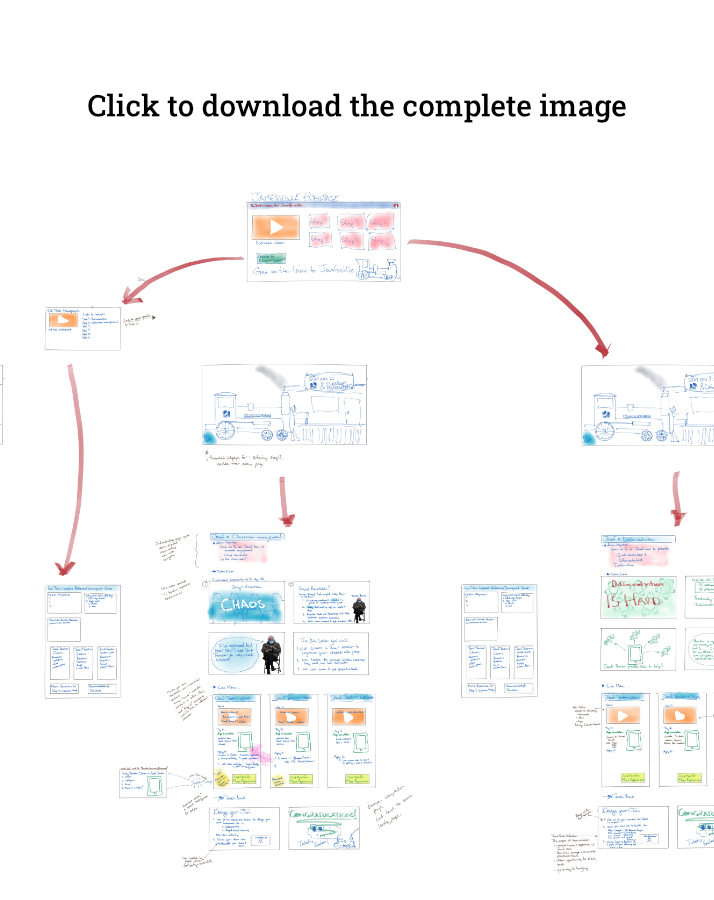
The map shows a two-track learning path where educators choose their own journey based on their role and goals:
Track 1: Classroom Educator - Focus on day-to-day classroom management (most common path)
Track 2: EdTech Leader - Broader view including device setup, policies, and supporting other teachers
Design Principles
1. Start with the pain, not the feature
Each lesson begins with a relatable classroom scenario—from personalizing learning experiences to managing student interactions and enabling effective remote learning. Only after establishing the problem do we introduce the Jamf Teacher solution.
2. Graduated complexity
Each lesson builds on classroom management fundamentals, progressing from personalization and student grouping to remote learning capabilities and collaborative classroom control.
3. Micro-credentials for motivation
Each lesson awards a digital badge that educators can share on LinkedIn. This served dual purposes:
- Intrinsic motivation: Visible progress markers
- External credibility: Proof of professional development for administrators
4. Dual-use design
Every lesson includes:
- Self-paced content for individual learners (video, interactive practice, knowledge checks)
- Facilitator guide for EdTech leaders running group PD sessions (discussion prompts, hands-on activities, troubleshooting tips)
This made the course useful for both individual educators and professional development facilitators.
The Solution
I designed and developed Jamf Educator, a four-lesson eLearning course with branching paths for different user types.
Course Structure
The course includes four core lessons, each designed around a specific classroom challenge:
Jamf & Differentiation Use Jamf Teacher to personalize each learner's iPad experience in the classroom
Jamf & Student Interaction Use Jamf Teacher to set up student groups, and limit student messaging with students outside their groups
Jamf & Remote Learning Control student iPads remotely, set up video conferencing URLs that students can easily join
Jamf & The Collaborative Classroom Use Lessons in Jamf Teacher to customize what apps and websites are available to students, and which aren't
What Each Lesson Includes
- Teacher's Guide (EdTech Track) - Facilitator materials for group professional development use
- Video Introduction - Brief scenario-based introduction to the classroom challenge
- Interactive Simulation - Hands-on practice using Articulate Storyline simulations
- Tasks and Scenarios - Real-world application exercises
- Short Quiz - Knowledge check to assess understanding and unlock digital badge
Instructional Strategies
Scenario-based learning - Every feature is taught in the context of a real classroom situation
Just-in-time instruction - Short video demonstrations (2-3 minutes) followed immediately by practice
Knowledge checks - Formative assessments after each section to ensure comprehension before moving forward
Optional deep dives - Supplemental content for advanced users who want to explore beyond basics
Printable resources - Quick-reference guides and keyboard shortcuts for at-a-glance help
Technical Implementation
- Platform: Skilljar LMS with custom branding
- Content authoring: Articulate Storyline for interactive modules
- Video production: Screen recordings with voiceover (Camtasia), scenario videos (Adobe Premiere)
- Assessments: Knowledge checks embedded in Storyline, final quiz for badge eligibility
- Badging: Integrated with Credly for shareable digital credentials
Impact
Adoption and Engagement
- Live course: educator.jamf.com - still actively used 3+ years later
- Two-track design allowed both individual educators and professional development facilitators to use the same content
- Badge system incentivized completion and provided visible professional development credentials
Scalability
- Self-paced design eliminated the need for scheduled training sessions
- Dual-use materials (self-paced + facilitator guides) reduced development time for future PD content
- Modular structure allowed us to update individual lessons without rebuilding the entire course
Design Artifact as Communication Tool
- The Jamfsville learning journey map became an internal tool for stakeholder alignment
- Product teams referenced it when designing new features ("How does this fit into the educator journey?")
- Sales and customer success teams used it to explain training approach to prospective customers
What I Learned
Pain-point driven design changes everything. Starting lessons with "Here's the problem you face" instead of "Here's how the software works" dramatically improved engagement. That is, educators wanted solutions to classroom problems—not software tutorials.
The learning journey map was more valuable than I expected. I created the Jamf Educator journey map—codename: Jamfsville—to organize my own thinking during design. And yet, it became a shared reference for the entire company. Product, marketing, and training teams all used it to align on how educators experience Jamf Teacher. Visual artifacts communicate better than written specs.
Badge systems work—but only if the badges are meaningful. We integrated with LinkedIn and provided badge images optimized for social sharing. Educators didn't just complete the course—they showcased their new skills publicly, which created organic word-of-mouth marketing.
Dual-use design takes more work upfront but pays off long-term. Building facilitator guides alongside self-paced content meant twice the development effort initially, but it made the course 10x more useful. EdTech coordinators could run live PD sessions using the same materials individual teachers used independently.
Next time: I'd add more peer learning components. The course was heavily individualized, but educators learn best from each other. Adding discussion forums, educator case studies, or collaborative challenges would have increased engagement and retention.
Try It Yourself
The Jamf Educator course is live and free to access:
You can explore the full learning experience, see the two-track structure in action, and earn digital badges by completing lessons.